
EventEngine

Event software for HubSpot

EventEngine is for HubSpot teams with a full events calendar. Create the event once and the page, the registration form, the reminders and the follow-ups come with it. Nothing leaves your portal.

$249 a month. Unlimited events, registrations and users. Cancel any time.

Autumn members' webinarNew eventPublishEvent nameAutumn members' webinarTypeOnline · ZoomDates5 Nov, 14:00CategoryMembersCreate the event onceAutumn members' webinar5 November · 14:00 · OnlineSpeakersRegisterFirst nameLast nameEmailRegisteryourdomain.org/events/autumn-webinarThe page and the form appear on your domainRegister for this eventFirst nameSamLast nameHughesEmailsam@example.orgRegisterRegisteredForm submission on the contact recordEvery registration is a HubSpot form submissionConfirmationstraight awayReminder7 days beforeReminder1 day beforeCheck-inon the dayCancelled · Change of venueTen emails from one workflow, set onceLive on ZoomAttendance pulled after the sessionYou're registeredShow this at the doorChecked inZoom attendance online, QR check-in at the doorEvent Attended · Autumn webinarHubSpot list, built for youEvent Missed · Autumn webinarHubSpot list, built for youThanks for attending3 days after, to the right listSorry you missed it3 days after, to the right listAttended and missed lists, then the right follow-up

Every event is the same job again

If you run a lot of events in HubSpot, you know the routine. Clone last month's page. Clone the form. Clone the workflow. Change the dates in eight places and hope you found all eight.

Most teams end up with a checklist for it. One we know of had 14 steps, and step 9 was "check the reminder still says this year", because twice it hadn't.

The other route is a separate event tool. Then registrations arrive in HubSpot as imports, your attribution reports can't see them, and someone spends the morning after matching a spreadsheet of attendees to contacts.
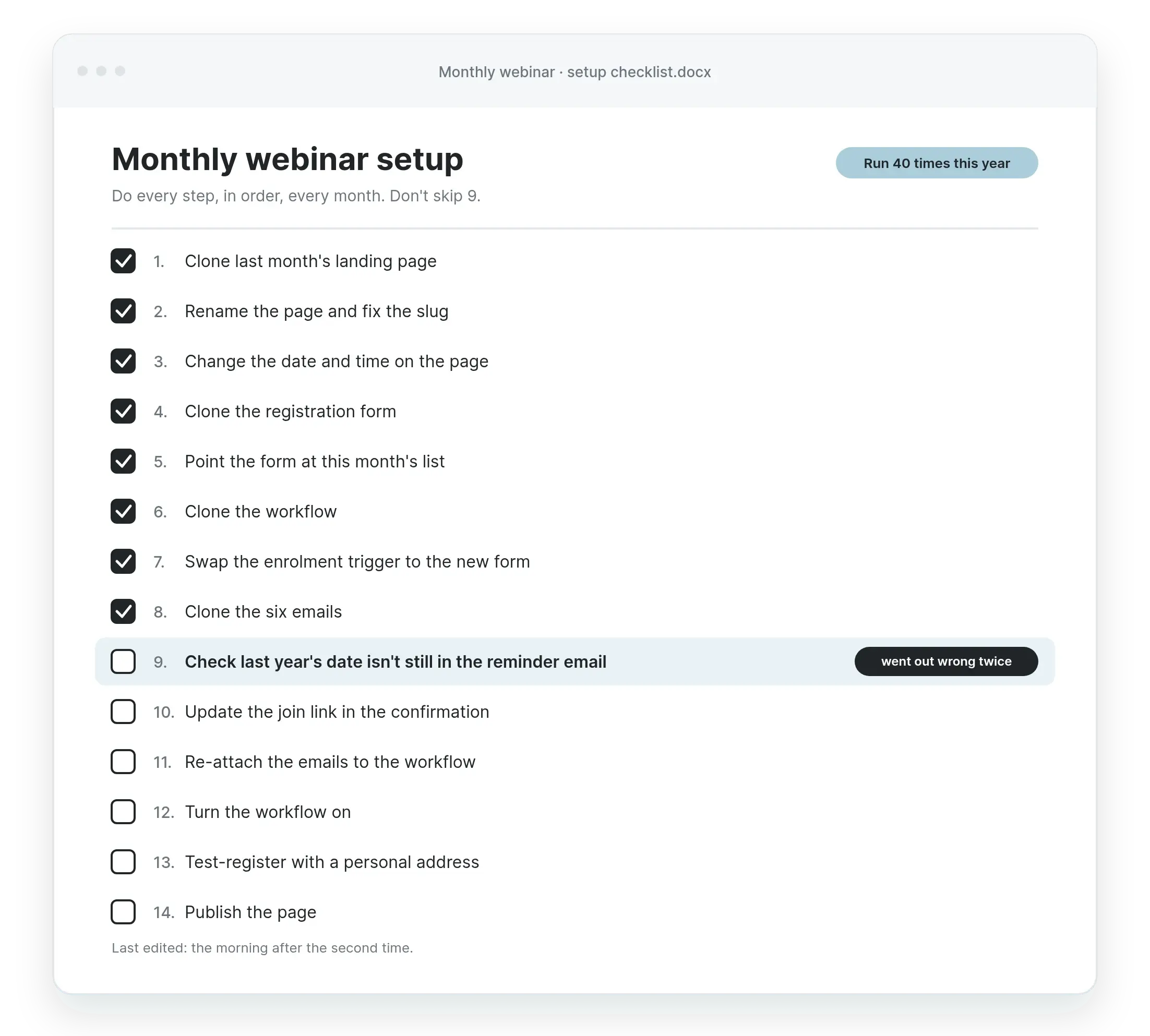
A 14-step monthly webinar setup checklist, ticked to step 8, with step 9 highlighted: check last year's date isn't still in the reminder email

What happens instead

1

You create the event

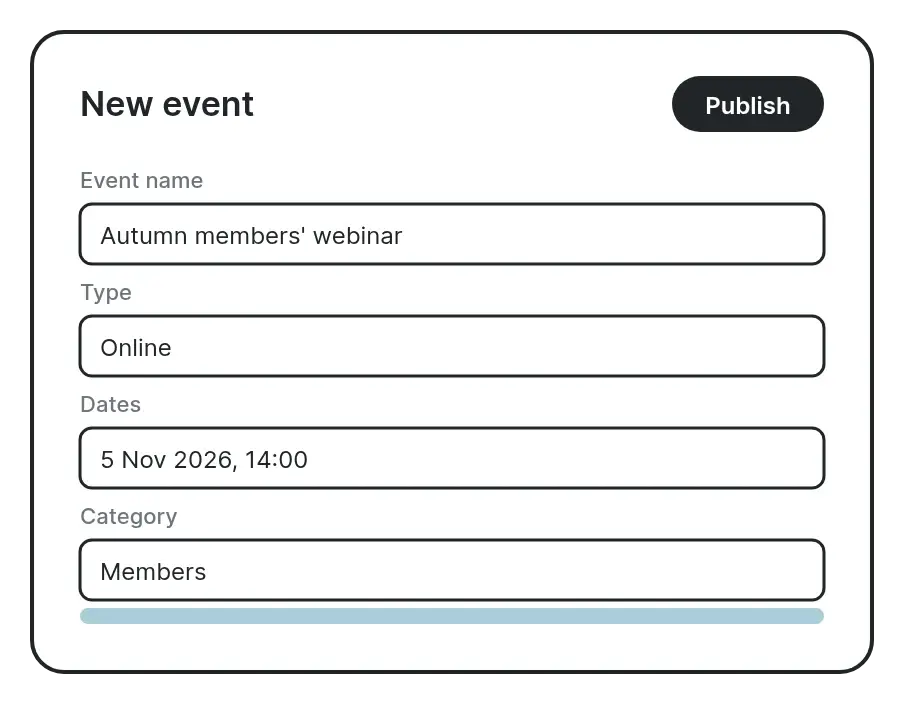
The new event form in EventEngine

Name, dates, venue or Zoom link, capacity, a picture. About the same effort as a calendar invite.
2

The page and the form appear

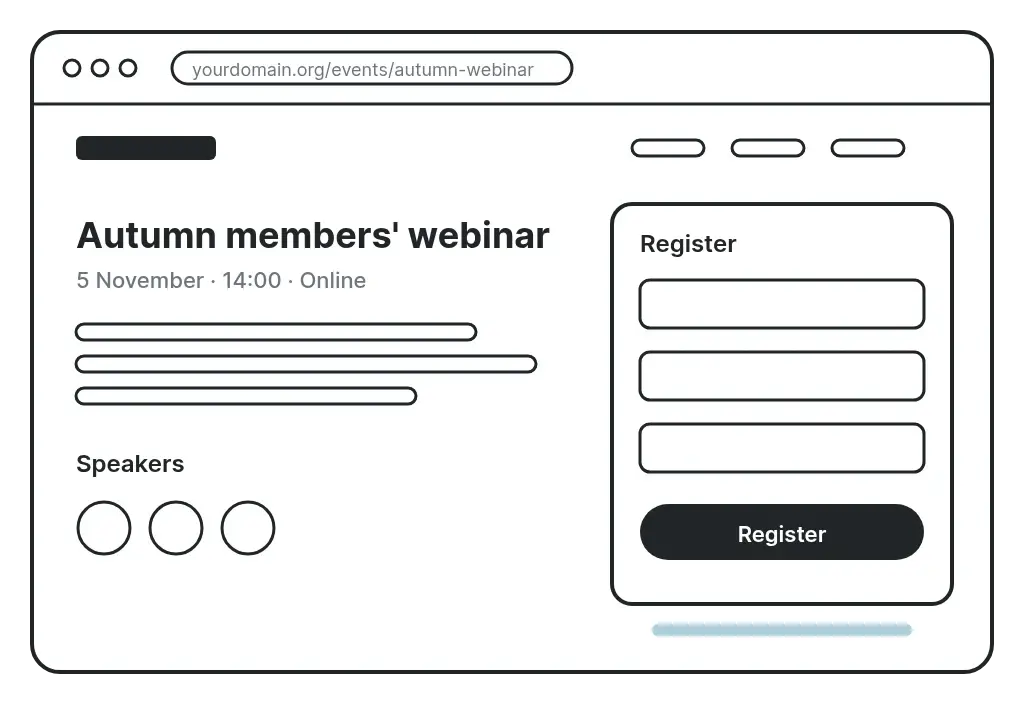
The event page on your own domain with its registration form

On your site, in your theme, with your header and footer. Nothing to build and nothing to clone.
3

The emails and the lists run themselves

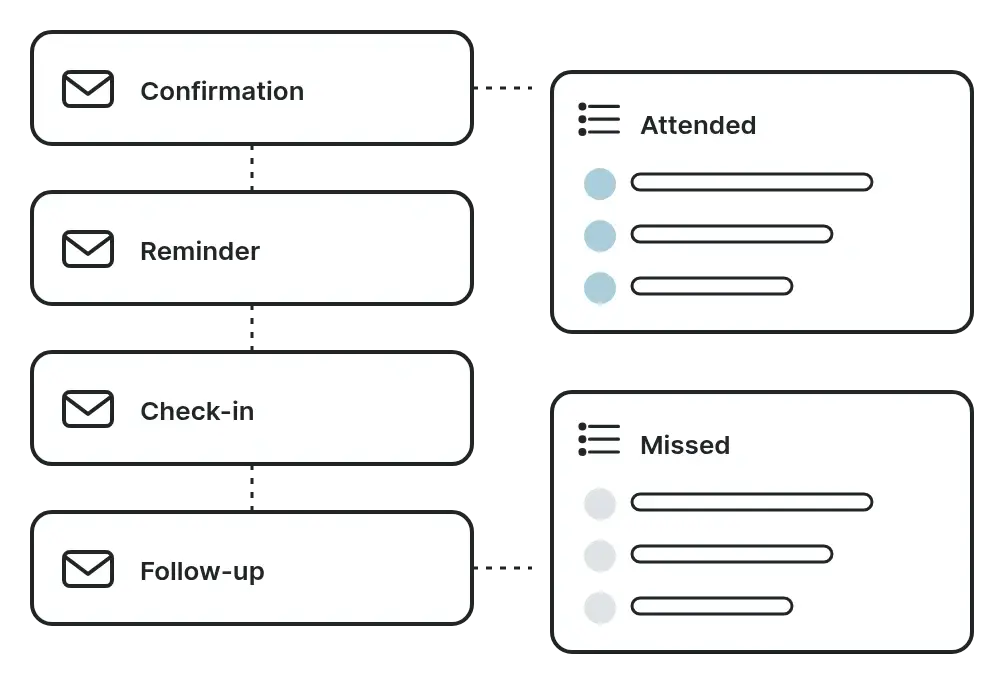
The email chain and the attended and missed lists

Confirmation, reminders, check-in, thank you, sorry you missed it. Attended and missed lists build after the event, ready for follow-up.

Built for teams that run events every month

Marketing teams with a webinar programme. Training providers with a course calendar. Membership bodies with branch meetings, CPD sessions and an annual conference. Agencies running events for clients.

The common thread is volume. If you run 3 events a year, HubSpot on its own is fine. If you run 3 a month, the cloning is where your week goes, and that's the part EventEngine takes off you.

Every event gets its own page on your site, and the listing lets people filter by type, location and date, with a calendar view.

Events listing with filters, grid view and a calendar view
An event page with the registration form, and the form submission logged in HubSpot

Your registrations count in your reports

Every sign-up is a HubSpot form submission on the contact's timeline, so your attribution, your lead scoring and your sales team all see it. Events stop being the channel that's missing from the dashboard.

In person, online or both, with a capacity limit if you want one and an opt-in to your list in your own wording.

The reminders go out on time, every time

Ten emails, one workflow, installed into your portal by EventEngine. Put your logo on the templates, switch it on, and every event from then on uses the same set. Nobody writes a reminder at 4pm the day before.

  • Confirmation, reminder a week out, reminder the day before
  • Check-in reminder, thank you, sorry you missed it (in-person and online versions)
  • Cancellation and change of venue, for when you need them
Someone registersHubSpot form submissionConfirmationSent straight away7 days beforeReminder 17 days before1 day beforeReminder 21 day beforeOn the dayCheck-in reminderMorning of the event, QR code attachedAttendedMissedThanks for attendingIn-person and online versionsSorry you missed itIn-person and online versionsSent when you need themEvent cancelledTo everyone registeredChange of venueTo everyone registeredOne workflowInstalled by EventEngine.Brand the templates once,switch it on, every eventuses it.

The morning after, the follow-ups have already gone

After a Zoom session, EventEngine matches who turned up against who registered and builds Attended and Missed lists in HubSpot. In the room, people show a QR code at the door. Either way, the right thank-you or sorry-we-missed-you goes out without anyone opening a spreadsheet.

  • Attended and Missed lists for every event
  • Attendance written to the contact record
  • QR check-in for the room, Zoom matching for the screen
Online: Zoom attendance, matched to your registrantsZoom participant reportPulled after the session ends41 min35 minnot seen51 min32 minnot seen57 min48 minmatchby emailEvent Attended · Autumn webinarHubSpot list, built for youfollow-up sentfollow-up sentfollow-up sentfollow-up sentfollow-up sentEvent Missed · Autumn webinarHubSpot list, built for youfollow-up sentfollow-up sentIn person: QR check-in at the doorYou're registeredShow this at the doorAutumn members' webinarDoor check-inScanned with any phone cameraChecked in: 3checked inchecked inchecked inSam Hughessam@example.orgjust nowAttendance goes on the contact record. Follow-up email goes out after.

It all stays in HubSpot

Your team works in the portal they already use. No second login, no export, no sync that breaks on a Friday. The pages, the form, the workflow and the lists are standard HubSpot objects.

For the feature list, hub requirements and setup guide, see eventenginepro.com.
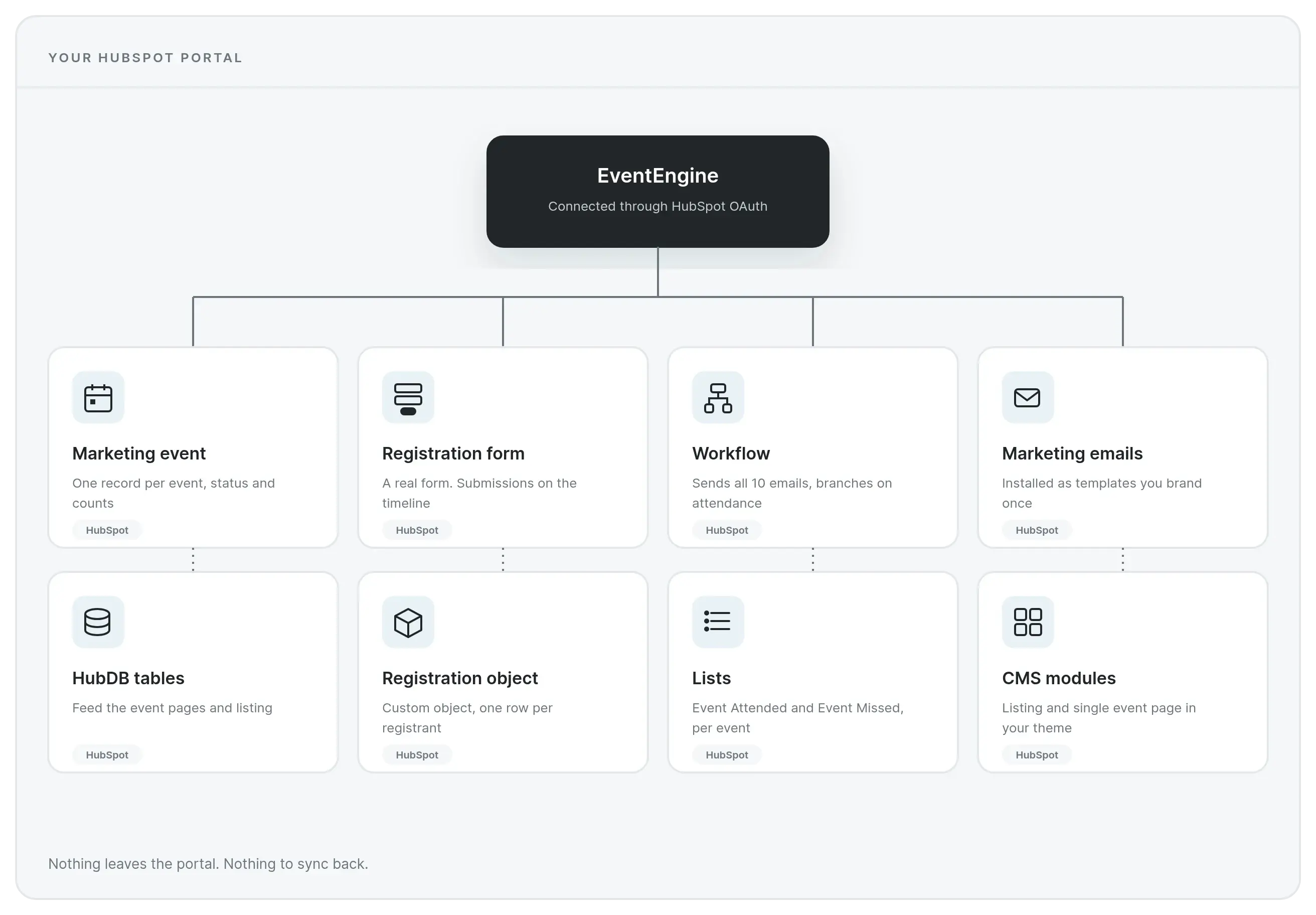
The HubSpot objects EventEngine writes to: marketing event, form, workflow, emails, HubDB, registration object, lists and CMS modules

Things people ask before they install

Does EventEngine replace HubSpot's marketing events?

No. Publishing an event in EventEngine creates a HubSpot marketing event record, so registrations and attendance stay on the objects HubSpot already reports on.

Do registrants have to register twice for Zoom?

At the moment, yes. They register on your page, then enter their name and email on Zoom's form when they join. Matching uses the email, so it's worth asking people to use the same one.

What does my portal need?

Content Hub Professional or above for the pages, Marketing Hub Professional or above for the emails. Marketing Hub Enterprise covers both. Zoom Pro or above if you want attendance matching. The full list is on eventenginepro.com, and it's the first thing we check on a call.

How long does setup take?

It installs through HubSpot, and the event pages, emails and workflow are created for you. You add your branding to the email templates, publish them, and switch the workflow on. Most portals are live the same day.

Can I keep using Eventbrite?

Yes. Eventbrite events synced into HubSpot get an EventEngine page like any other event, so ticketing can stay where it is.

Who builds and supports it?

Burrows Consultancy. We're a HubSpot Solutions Partner, we've been building for the web since 2001, and EventEngine came from building the same event setup for client after client until it made more sense to build it once.

Try it on your next event

The first 30 days are free, so there's time to set up an event and see how it feels. If you'd rather talk it through first, book a 20 minute call and we'll happily show you around.
